
The operating system for a pickleball venue
Your courts and your counter, on one screen.
DinkDesk runs a Philippine pickleball venue from the moment the first court is booked to the moment the drawer is counted — bookings and walk-ins, the cashier and the stock, open play without the group chat, and the tournament when you hold one.
A person reads every application — usually a decision within 3–5 business days, then we set your courts and your counter up with you.
- Free trial: 2 courts, the cashier, one tournament
- No card required, because there is no card
- Players never pay DinkDesk a centavo
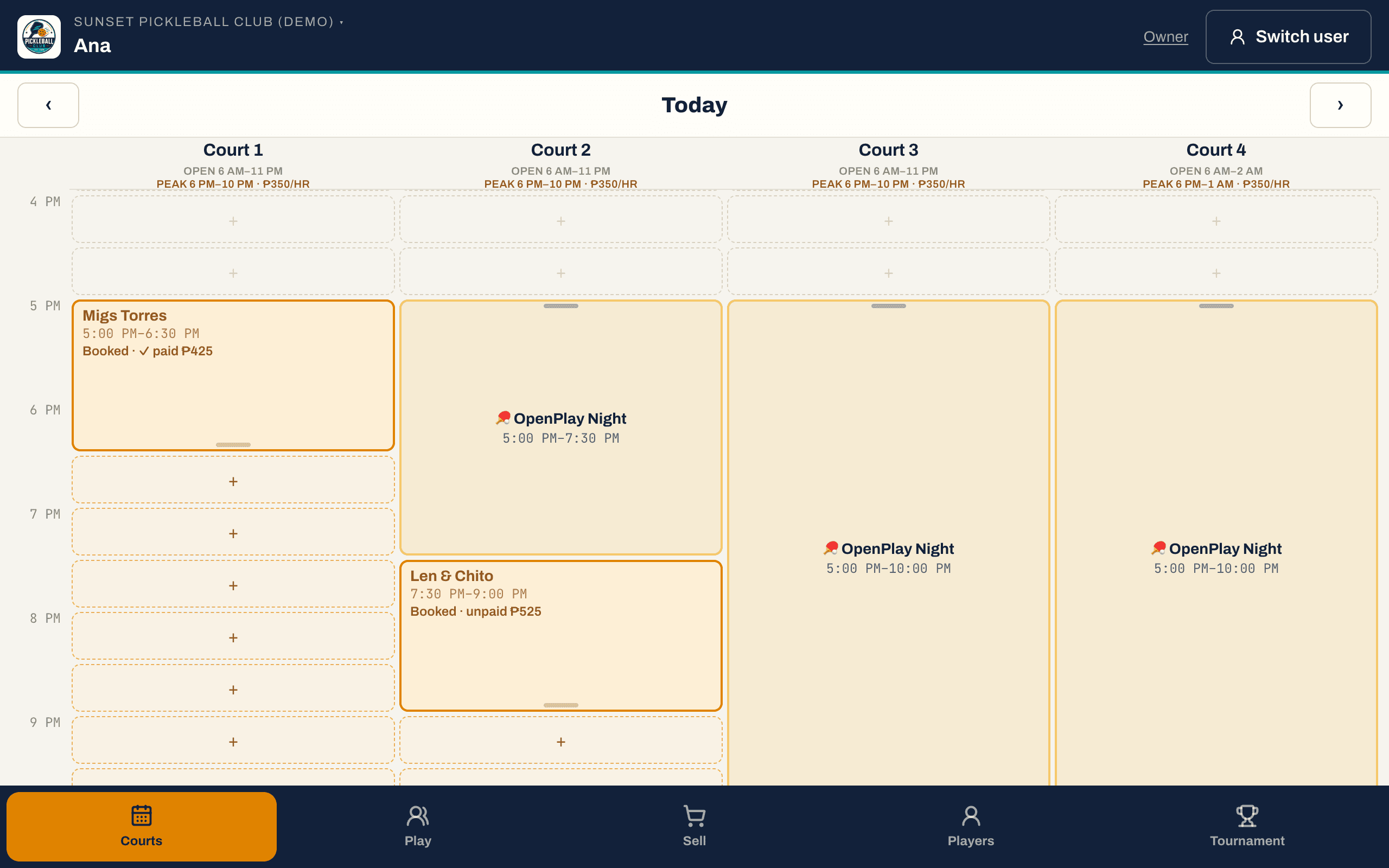
Booked · checked in · paid · no-show — the same grid at the counter and on your own screen
Six places, and not one of them knows what the others did.
It is free, it works, and every venue in the country starts here. It stops working at 7pm on a Friday, which is the hour you can least afford it to.
- MessengerThe bookingsSix threads, two of them from people who booked the same 7pm court.
- A notebookThe scheduleRewritten every morning, and only ever in one person's handwriting.
- A Viber albumThe paymentsGCash screenshots, and a mental note of who still owes for last week.
- The cash boxThe counterWater, balls and paddle hire, counted at midnight against nothing.
- A group chatOpen playOne person holding a phone, a list and a pen, saying who is next.
- A spreadsheetThe tournamentAnd a whiteboard for the draw, rubbed out when a team forfeits.
One screen at the counter. One record per person. One set of books.
Every row DinkDesk stores carries your club's id and hangs off one player record. So the woman who books court 3 on Tuesday, buys a bottle of water on the way out and enters your tournament in September is one person — and the software already knew that.
Two things every day, and two more when you need them.
Court rental and the counter are what a venue does from open to close, so they are the base. Open play and tournaments are switches, because plenty of venues run neither.
Every screen on this site is DinkDesk itself, running on our demo club — real software, not a real club's data.
Every court, every hour, on one grid
Your courts carry their own opening hours and a base and peak hourly rate. A walk-in needs a name and nothing else; a regular is picked off your player list. The price is worked out from the court's rate at the moment it was booked, so raising your rates next month never rewrites what somebody was already quoted.
- Six courts across a day, with a line that follows the clock
- Walk-in by name, regular by player record, weekly repeats as a series
- Base and peak hourly rates per court, priced at the moment of booking
- Drag to move it, drag its edge to make it longer, sweep to block a stretch
A counter your cashier can actually work
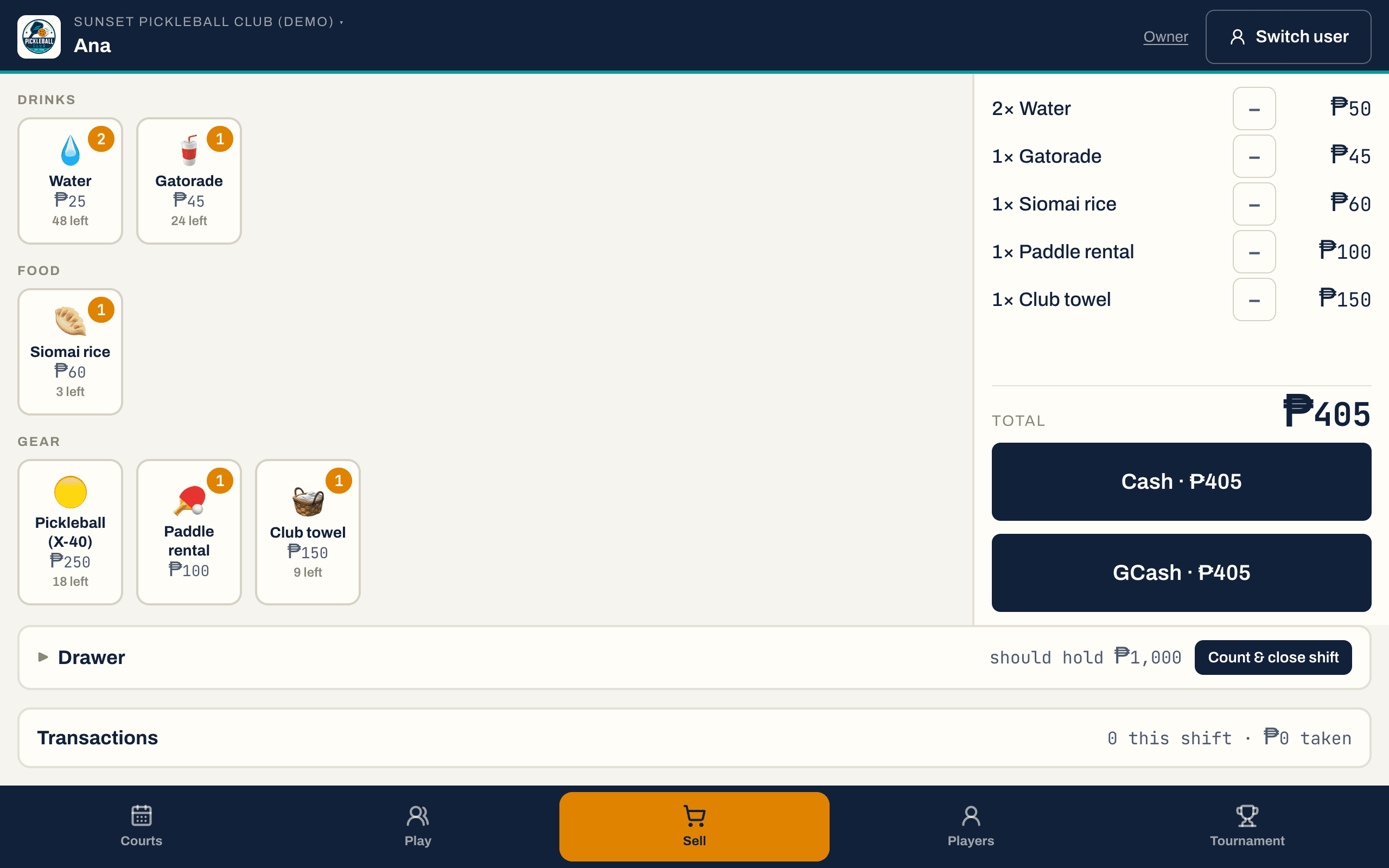
Water, Gatorade, balls, paddle hire — photo tiles the counter taps, not a code anybody has to memorise. Tracked stock is a hard ceiling: the till refuses to sell the twelfth ball out of a box of eleven rather than quietly going negative. Every shift opens with a counted float and closes with a Z-report that says over or short.
- Staff sign in with a PIN, not an email and a password
- Tracked stock is refused at zero, not allowed to go negative
- Shifts open with a float and close over or short
- Nothing goes back out at the counter without the owner's PIN, typed again every time
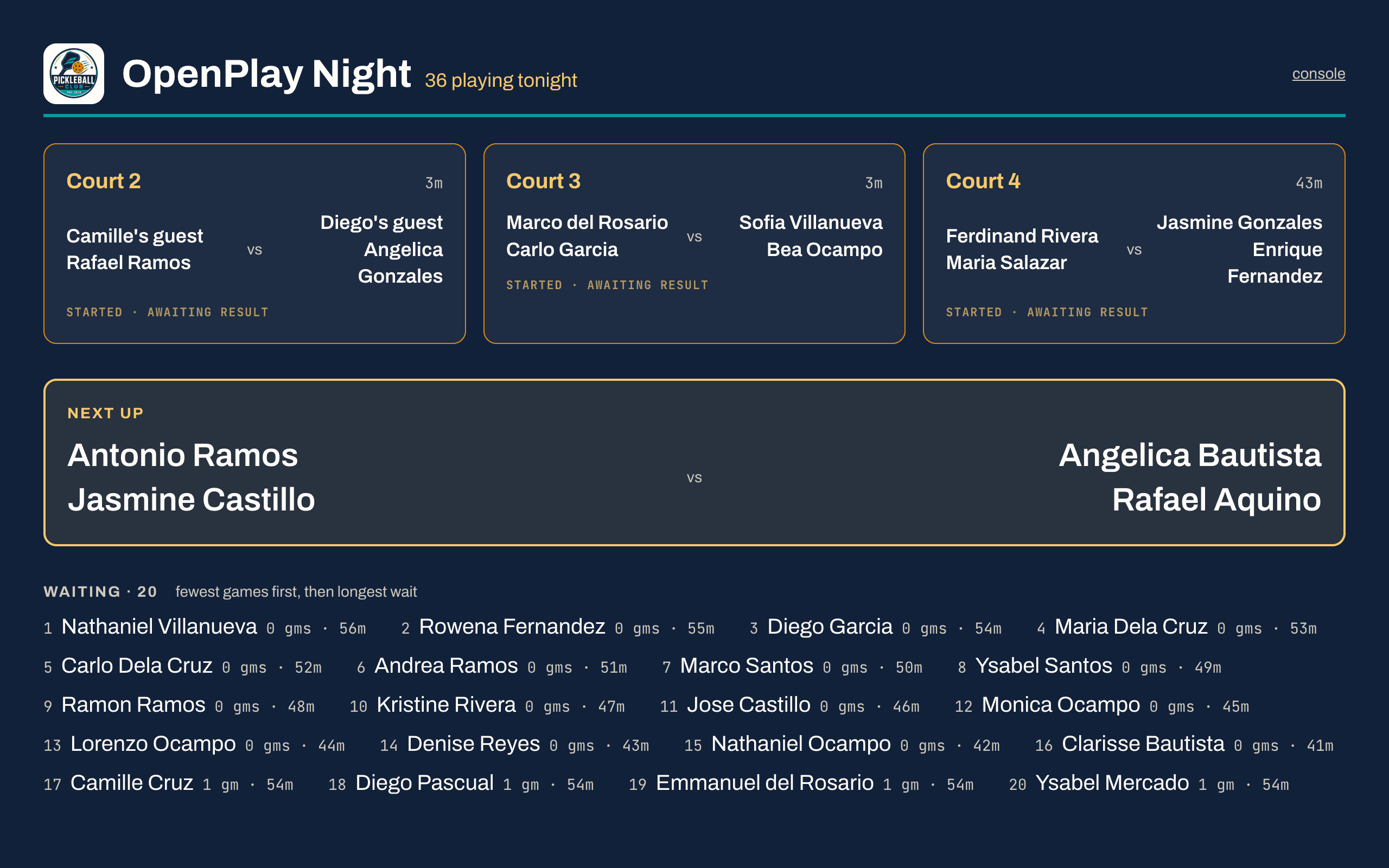
The queue everybody can see
A session carries its date, price per head, capacity and skill level, and repeats weekly if it is a regular night. Players reserve from their phone and pay you directly; you scan their code at the door. Then the rotation screen pairs the next game itself, on the venue TV as well as at the counter.
- One session post instead of a thread, a poll and a spreadsheet
- An unpaid hold expires and gives the spot back in time to resell it
- The bench is ordered for you — fewest games first, then longest wait
- It runs on the venue TV, so nobody has to ask whose turn it is
And on tournament weekend, the same system
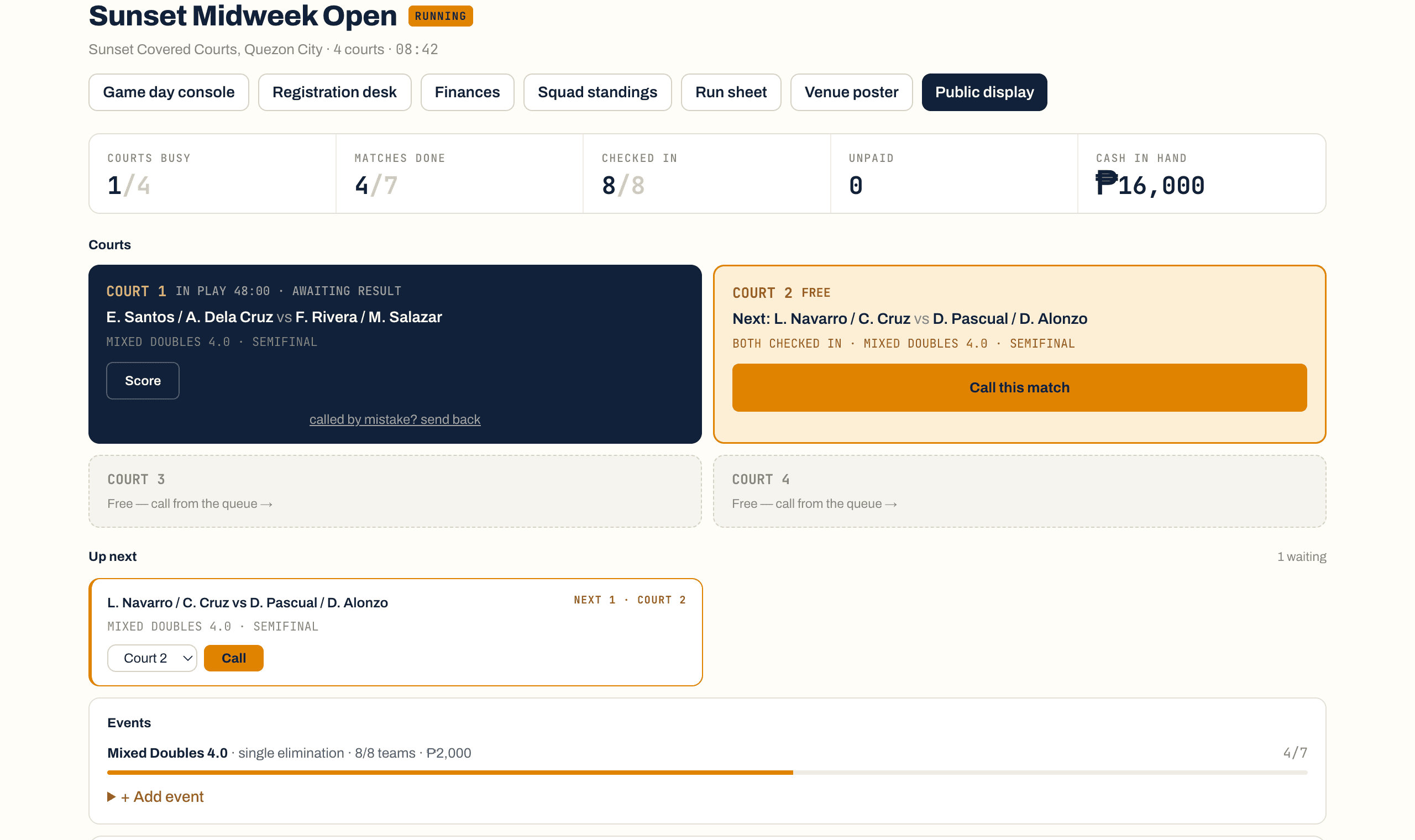
Divisions by gender, format, skill band and age; seeded draws that rebuild when somebody withdraws; point-by-point scoring from any phone and a board for the TV. It runs a club team day too — squads spread across the bands, every win banking a point for one running tally. Because it runs on the same club, the entrant who plays on Sunday is the same record as the regular who books court 3 on Tuesday, and the event's takings land in the same ledger.
- 5 draw formats, seeded and reproducible — or a squad day on one tally
- The door shows who still owes, in shares, as you check them in
- 13 scoring presets from any phone, and a printed run sheet for the wall
- Prizes computed from the fees you collected, never the fees you are owed
Your Tuesday booking and your Thursday regular are the same person.
Most software owns one box on this line. The expensive part of running a venue was never any single box — it is that today they are six systems, and nobody at the counter can tell you what the person in front of them is worth.
- Tuesday, 6pm — books court 3Rings the counter or walks up to it. An empty slot, a name, and the price comes off the court's own peak rate.
- At the door — checked inThe block changes state on the grid, so anybody on the counter can see who has actually turned up.
- On the way out — a bottle of waterSame counter, same shift, same drawer. The sale lands on the till that will be counted at close.
- Thursday — reserves a spot at open playFrom their own phone, off the club board, paid to your own GCash. You scan the code at the door.
- Thursday, later — plays four gamesThe rotation put them on court without anybody holding a list, because it knows who has waited longest.
- September — enters the tournamentSame player, same record, same rating — which is what decides whether they belong in the 3.5 draw.
And every peso of that — the court hire, the water, the open play spot, the entry fee — lands in one ledger, without anybody exporting anything.
That is the whole reason to buy a venue system rather than a booking calendar and a separate till: not that it does more things, but that the things it does are the same things about the same people.
DinkDesk Venue is ₱1,499 a month — the booking grid and the counter behind it. At ₱250 an hour, that is six hours of court time a month.
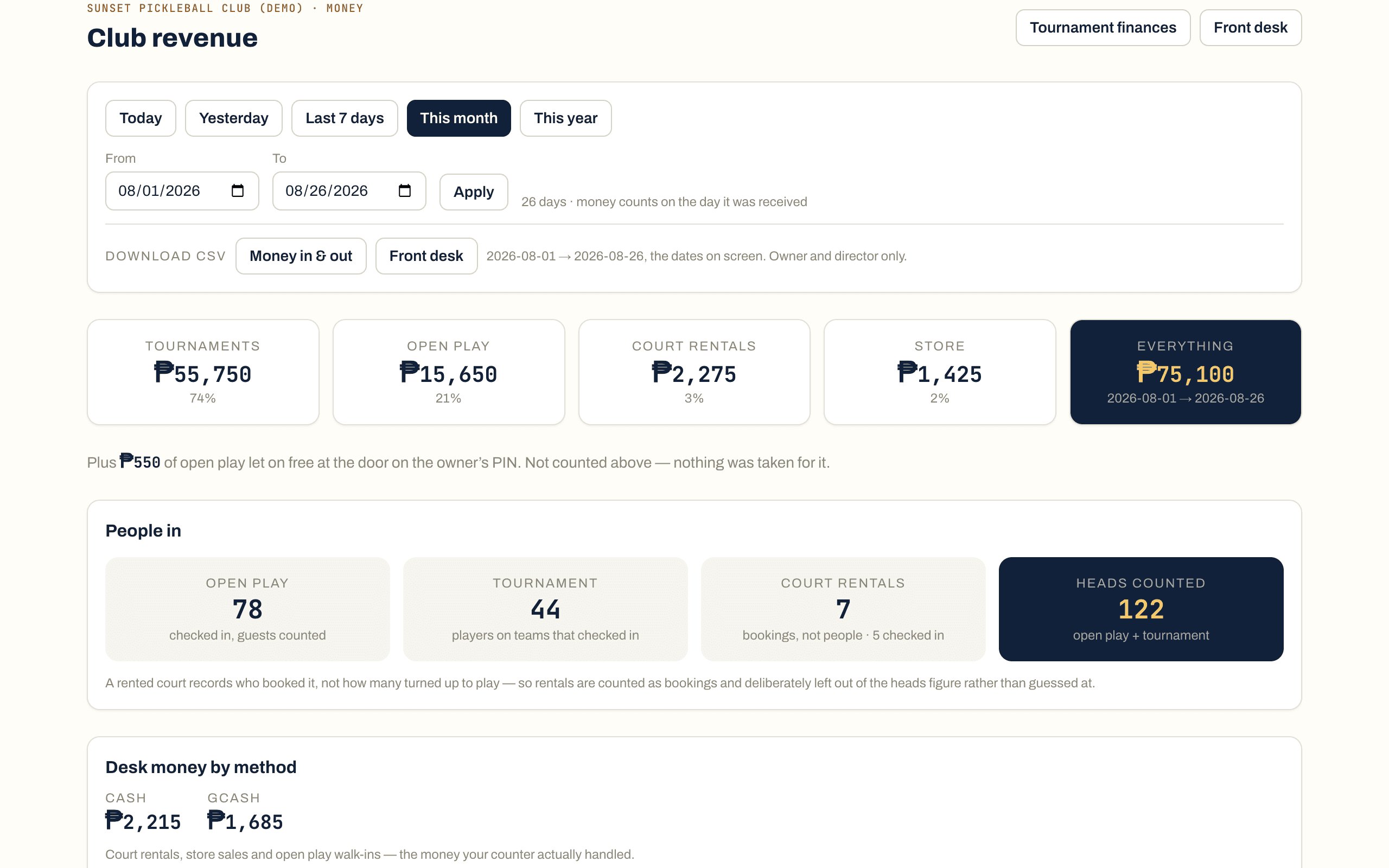
What did today actually make?
The counter is for staff. This screen is for you — and it is the same data, so there is nothing to reconcile and nobody to ask.
- Four streams, one total
- Court rentals, the counter, open play and tournaments, each as a peso figure and a share of the whole, over any date range you pick.
- How the money actually arrived
- Cash against GCash, for the rentals and the counter together — the money your desk physically handled, which is the number that has to match the drawer.
- Which courts are working
- Hours booked, utilisation and booked value per court, so the question “do I need a seventh court” has an answer that is not a feeling.
- When your venue is busy
- The three busiest hours across the range. It is what a peak rate should be set from, and what a promo should be aimed at.
Plus the journal: every booking taken, moved, checked in and paid, every sale, every shift opened and closed, every refund and what it was for, with the name of whoever did it. The counter cannot edit it and cannot delete from it.
What you let people on for free is printed beside the total rather than inside it — a waived spot that quietly vanishes from the takings is how a club gives away thousands a week without ever seeing it. And the range you are looking at is the range that exports: the download button carries the dates on screen, and says so next to itself, so the file your accountant opens covers the days you were reading.
And you do not have to be home to read it. Type your owner PIN into any staff screen in the building and this same report opens on top of it — today, yesterday, the last seven days, the month — along with every shift’s float, counted cash and over-or-short. Close the panel and the club’s settings lock behind you again. It is your PIN, not a staff PIN, and it is the only way money goes back out at the counter.
Start with DinkDesk Venue. Add what you actually run.
One base price for courts and the counter, and two switches for the things not every venue does. In pesos, published, and never a cut of anything you collect.
₱1,499per month · DinkDesk Venue
Tick both and it becomes DinkDesk Complete at ₱2,999 — ₱250 less than the parts.
- Paid for the year
- ₱14,990
- One-time setup
- ₱2,500 · waived on annual
₱1,500per event
Switch tournaments on for one event without keeping the module. Past about 8 events a year the ₱1,000 monthly module costs you less, and we will say so rather than let you keep buying these. Arranged with us — it is not a button yet.
Ask us to switch it on →₱2,500per event
The DinkDesk Tournament Pass: one tournament, up to 64 players, 4 committee codes, 30 days. No subscription, no courts, no counter — for independent organizers, schools, corporate events and anyone running one weekend in a rented venue.
Buy a DinkDesk Tournament Pass →Take real bookings, check people in, ring up real sales, open a drawer and close it with a Z-report — on 2 of your courts, before you decide anything. One complete tournament is in there too, up to 32 players. No card, because there is no card.
| Feature | DinkDesk VenueFor a venue that rents courts and sells over a counter | DinkDesk CompleteFor a venue that also runs open play and events | DinkDesk Tournament PassFor an organizer with no venue at all |
|---|---|---|---|
| Price | ₱1,499 / month | ₱2,999 / month | ₱2,500 one-off |
| Paid for the yearpay for 10 months, get 12 | ₱14,990 | ₱29,990 | — |
| One-time setup feewaived if you pay annually | ₱2,500 | ₱2,500 | None |
| Court rental and the cashierbookings, walk-ins, stock, shifts, the drawer | Up to 8 courts | Up to 8 courts | — |
| Open play sessions | — | Unlimited | — |
| Tournaments open at once | — | Unlimited | 1 |
| Players per tournament | — | 256 | 64 |
| Committee codes per tournamentone code is one seat at the desk | — | 8 | 4 |
| Your logo and club colour | Yes | Yes | — |
| Buy DinkDesk Venue | Get set up on DinkDesk Complete | Buy DinkDesk Tournament Pass |
Every number in this table is read straight out of the code that enforces it, so it cannot quietly stop being true.
About the ₱2,500 setup fee
It pays for work we actually do: creating your courts with their base and peak rates, loading your product catalogue into the cashier, importing your player list, issuing staff PINs and sitting with your counter through their first shift. That is half a day to a day of real time, and it is the difference between software you bought and software your staff use. Pay for the year and we waive it. That is not generosity — GCash still has no working auto-debit here, so a monthly club is twelve manual collections a year and an annual club is one. Year one on DinkDesk Venue is ₱20,488 monthly against ₱14,990 annually — ₱5,498 less, for the same year. The DinkDesk Tournament Pass has no setup fee: there is nothing to set up that you cannot do yourself in an afternoon.
The cheap plan is not the crippled plan
What changes between DinkDesk Venue and DinkDesk Complete is which modules are switched on. Everything below is on every plan, including the trial.
More than 8 courts, or several venues under one owner? Talk to us. We price those by hand. Pay by GCash, Maya or bank transfer; we confirm the reference and switch you on, usually the same day.
Running one tournament in a hall you rented?
Then you do not need any of the above. The DinkDesk Tournament Pass is one tournament, up to 64 players, 4 committee codes and 30 days — no subscription, no courts, no counter. It is the same engine venues use on tournament weekend, sold on its own for independent organizers, schools, corporate events and mall activations. If you already have a venue on DinkDesk, switching tournaments on for one event is ₱1,500 instead.
Software rules you should not have to ask about.
These are not policy on a page we can rewrite. They are the way the gates are built.
Your data leaves whenever you want
Your players, every peso in and out, the desk journal and a full archive of everything else — 4 files from a button in Settings, not a support ticket. It keeps working after you stop paying us.
Enforced by canExport()Nothing is switched off mid-event
If your subscription lapses in the middle of a tournament, the tournament finishes: score it, take payments, pay prizes, print certificates. And the counter never closes over an invoice — the drawer you opened can always be closed.
Enforced by canWorkOnTournament()14 days of grace, then a conversation
Nothing is withheld the day a payment is late. You get 14 days in which everything works exactly as it did, with a banner saying how long is left. No club has ever been locked out by surprise, and none will be.
Enforced by GRACE_DAYSSix things you would find out in week one anyway.
You are going to ask a competitor's salesperson these questions and get a softer answer. Here is ours, in writing, before you pay.
- It needs the internet
- There is no offline mode. If your connection drops, the counter cannot take a booking or ring up a sale until it is back. It runs in any browser, so a staff phone on mobile data is the fallback — but that is a workaround, not a feature, and we are not going to call it one.
- It records money; it does not collect it
- GCash, Maya and bank transfers go to your own accounts, and somebody types the reference in. There is no wallet integration and no automatic reconciliation. The upside is that we never hold a peso of yours and never take a cut of an entry fee.
- It is not an accredited POS
- DinkDesk records the sale and the drawer. It does not issue BIR receipts, and it does not talk to a receipt printer, a barcode scanner or a cash drawer. Keep issuing receipts however you do today.
- There is no app to download
- Not for you, your staff or your players. It runs in the phone browser and can be added to a home screen. If a native app is what you are shopping for, this is not it.
- The rating is ours, not DUPR's
- Players carry a DinkDesk rating that moves on every recorded result and can gate a capped division. We do not sync with DUPR and do not claim to.
- One venue at a time
- A club is one venue with its own courts, staff and books. Several branches under one owner is priced by hand, not something you can switch on yourself.
Where DinkDesk wins, and where it does not.
You are going to compare us to something. Here is the honest version, including the comparisons we lose.
| Capability | DinkDesk | A court-booking app | A shop till | A tournament-only platform | Sheets and a group chat |
|---|---|---|---|---|---|
| A booking grid for every court | Yes | Yes | No | No | By hand |
| Walk-ins priced off the court's own peak rate | Yes | Usually | No | No | By hand |
| A cashier with tracked stock | Yes | No | Yes | No | No |
| Shifts, a counted float and a Z-report | Yes | No | Yes | No | No |
| Open play sessions and a court rotation | With the add-on | No | No | No | A person with a list |
| Draws, seeding and live scoring | With the add-on | No | No | Yes | A whiteboard |
| One player record across all of it | Yes | No | No | No | No |
| Court money, counter money and event money in one ledger | Yes | No | Counter only | Event only | No |
| Priced in pesos, with no cut of what you collect | Yes | Often per booking | Yes | Often per entry | Free |
Columns are categories of software rather than named products, so every cell is true by what the category is. We do not publish claims about a named competitor's features or prices.
The rest of it.
The ones that decide a purchase are answered above, in the open. These are the leftovers.
How long before my counter is actually using it?
Can I try it on my real venue before I decide?
How do I pay you, and what happens if I am late?
Do you take a cut of my court hire, my bar or my entry fees?
What do my players have to do?
I have more than eight courts.
Will I hit a limit without warning?
Can I get my data out?
Am I tied in?
Who do I call when something breaks at 8pm on a Saturday?
I am already on DinkDesk Starter or DinkDesk Club.
Do you host it in the Philippines?
Tomorrow's bookings are already in somebody's Messenger.
Tell us how many courts you have and what your rates are. We will set the venue up — courts, hours, peak rates, your product catalogue, staff PINs — and stand behind your counter for the first shift. Or run 2 courts and the cashier on the free trial first and decide afterwards.